From verion 0.4.10 of the circlize package, there is a new group
argument in chordDiagram() function which is very convenient for making
multiple-group Chord diagrams.
I first generate a random matrix where there are three groups (A, B, and C).
Note this new functionality works the same for the input as a data frame.
library(circlize)
mat1 = matrix(rnorm(25), nrow = 5)
rownames(mat1) = paste0("A", 1:5)
colnames(mat1) = paste0("B", 1:5)

mat2 = matrix(rnorm(25), nrow = 5)
rownames(mat2) = paste0("A", 1:5)
colnames(mat2) = paste0("C", 1:5)

mat3 = matrix(rnorm(25), nrow = 5)
rownames(mat3) = paste0("B", 1:5)
colnames(mat3) = paste0("C", 1:5)

mat = matrix(0, nrow = 10, ncol = 10)
rownames(mat) = c(rownames(mat2), rownames(mat3))
colnames(mat) = c(colnames(mat1), colnames(mat2))
mat[rownames(mat1), colnames(mat1)] = mat1
mat[rownames(mat2), colnames(mat2)] = mat2
mat[rownames(mat3), colnames(mat3)] = mat3
mat
##        B1     B2     B3    B4    B5     C1     C2     C3    C4       C5
## A1 -0.085  0.016  0.091 -0.50 -1.27  0.051 -1.679  0.088 -0.76  0.01749
## A2  0.945 -0.107  1.274 -0.20  0.11  0.140 -0.711  1.380 -0.41 -0.99425
## A3 -0.414 -0.444  0.938 -0.36  0.55  1.389 -0.477 -1.159  0.80  0.25352
## A4 -0.898 -0.434  2.179 -0.16  1.58  1.377 -1.152 -2.465 -0.89 -0.40290
## A5  1.695 -0.799 -0.276  0.38  1.36 -0.141  0.234  1.819 -0.37 -0.00056
## B1  0.000  0.000  0.000  0.00  0.00  0.927  0.790 -1.152 -0.87  0.49555
## B2  0.000  0.000  0.000  0.00  0.00  0.602 -0.938  0.484  0.45  0.34223
## B3  0.000  0.000  0.000  0.00  0.00 -0.147 -0.763  0.149 -0.90  0.06670
## B4  0.000  0.000  0.000  0.00  0.00  0.208 -0.365  1.239 -1.23  0.82139
## B5  0.000  0.000  0.000  0.00  0.00 -0.622  0.022  0.262  1.45  0.23556
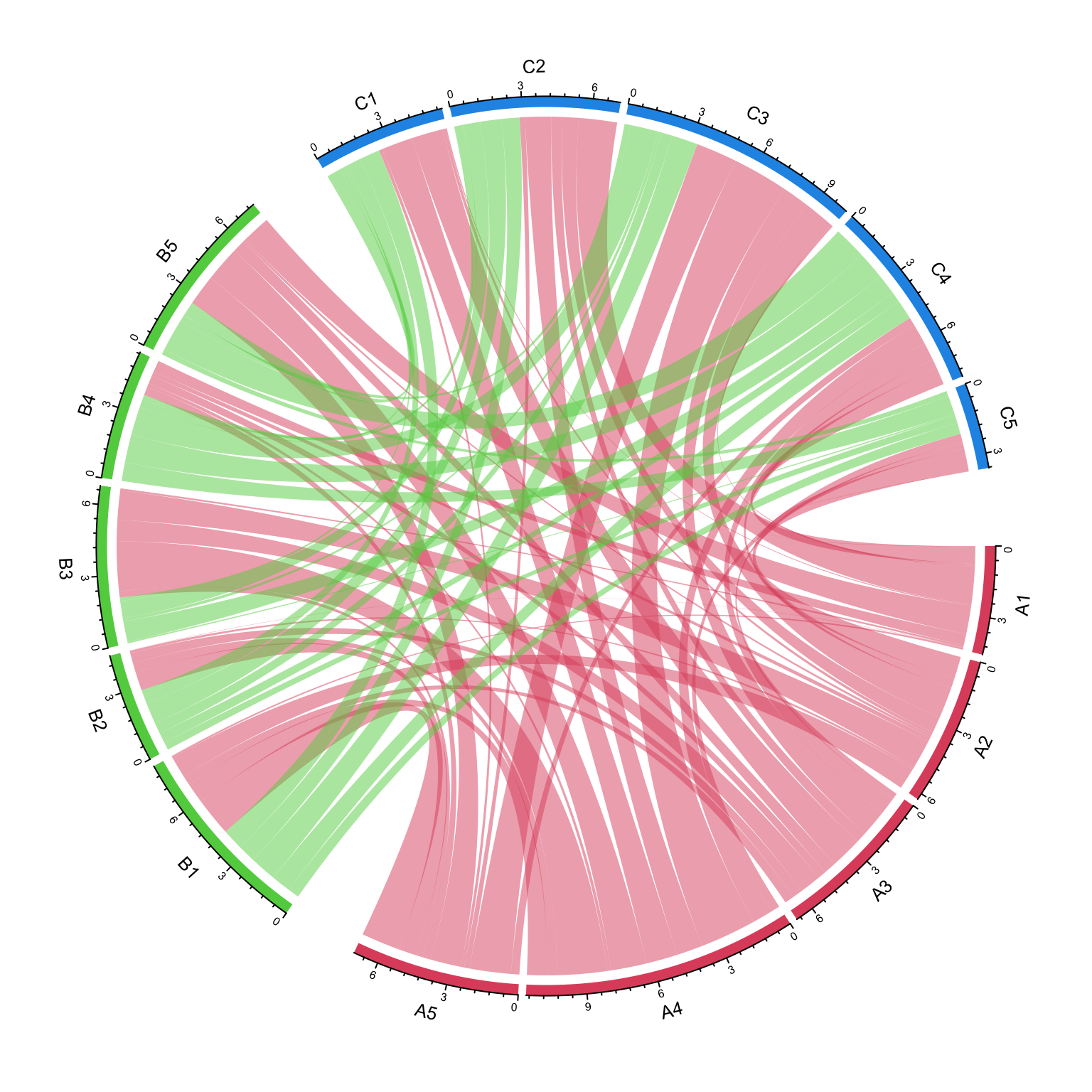
The main thing is to create “a grouping variable”. The variable contains the group labels and the sector names are used as the names in the vector.
nm = unique(unlist(dimnames(mat)))
group = structure(gsub("\\d", "", nm), names = nm)
group
##  A1  A2  A3  A4  A5  B1  B2  B3  B4  B5  C1  C2  C3  C4  C5
## "A" "A" "A" "A" "A" "B" "B" "B" "B" "B" "C" "C" "C" "C" "C"
Assign group variable to the group argument:
grid.col = structure(c(rep(2, 5), rep(3, 5), rep(4, 5)),
                names = c(paste0("A", 1:5), paste0("B", 1:5), paste0("C", 1:5)))
chordDiagram(mat, group = group, grid.col = grid.col)
circos.clear()
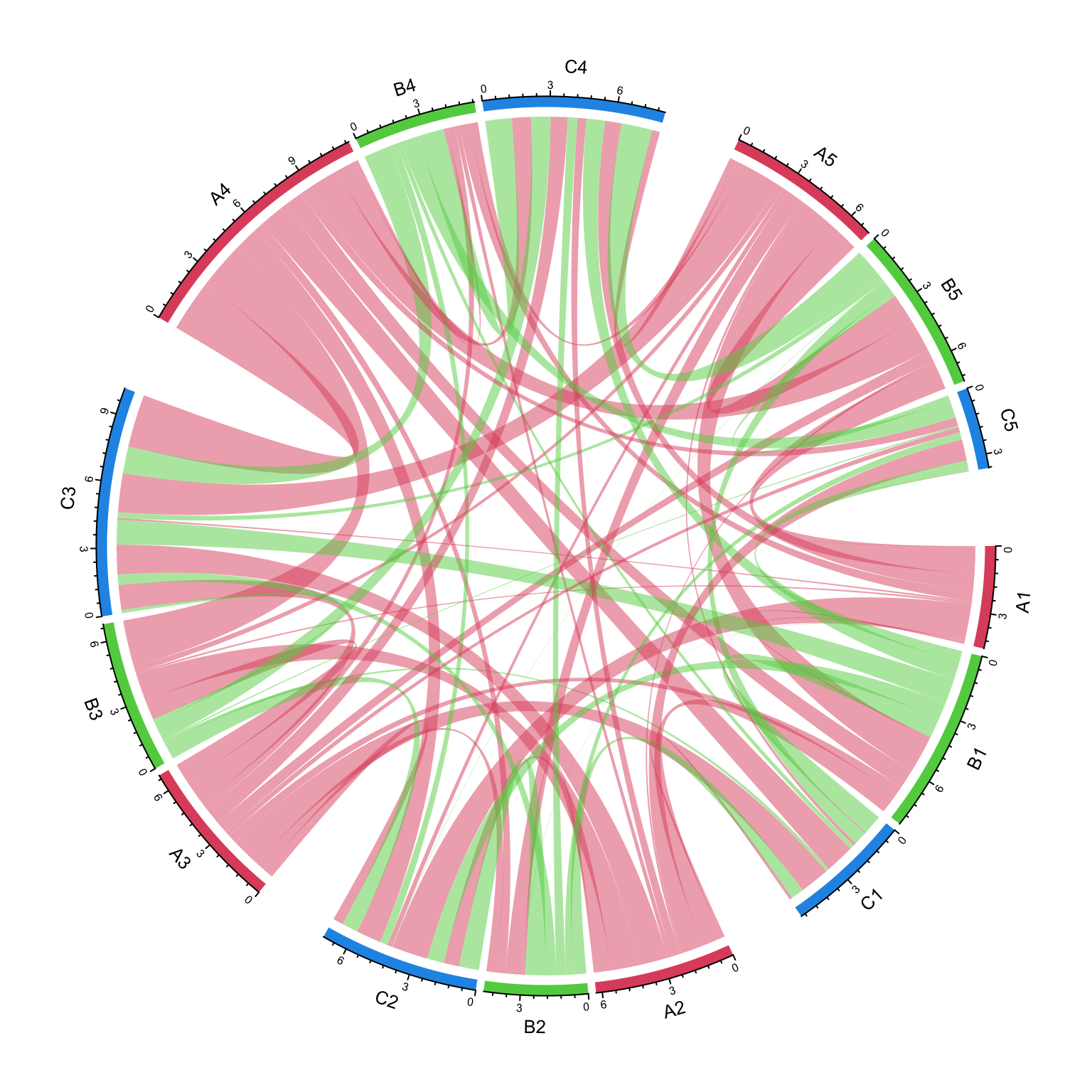
We can try another grouping:
group = structure(gsub("^\\w", "", nm), names = nm)
group
##  A1  A2  A3  A4  A5  B1  B2  B3  B4  B5  C1  C2  C3  C4  C5
## "1" "2" "3" "4" "5" "1" "2" "3" "4" "5" "1" "2" "3" "4" "5"
chordDiagram(mat, group = group, grid.col = grid.col)
circos.clear()
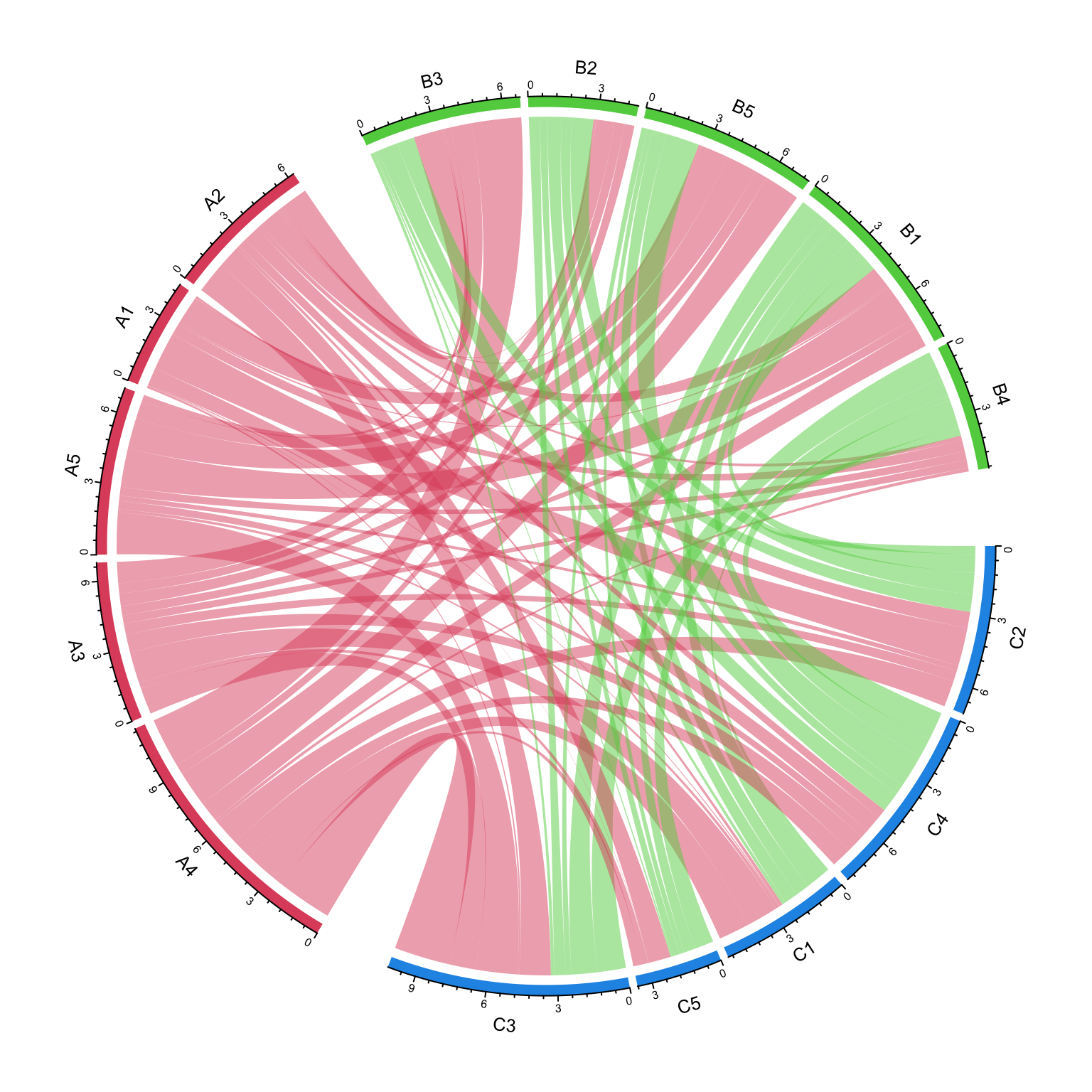
The order of group controls the sector orders and if group is set as a factor,
the order of levels controls the order of groups.
group = structure(gsub("\\d", "", nm), names = nm)
group = factor(group[sample(length(group), length(group))], levels = c("C", "A", "B"))
group
## C2 C4 A4 A3 B3 B2 A5 A1 C1 C5 A2 B5 B1 B4 C3
##  C  C  A  A  B  B  A  A  C  C  A  B  B  B  C
## Levels: C A B
chordDiagram(mat, group = group, grid.col = grid.col)
circos.clear()
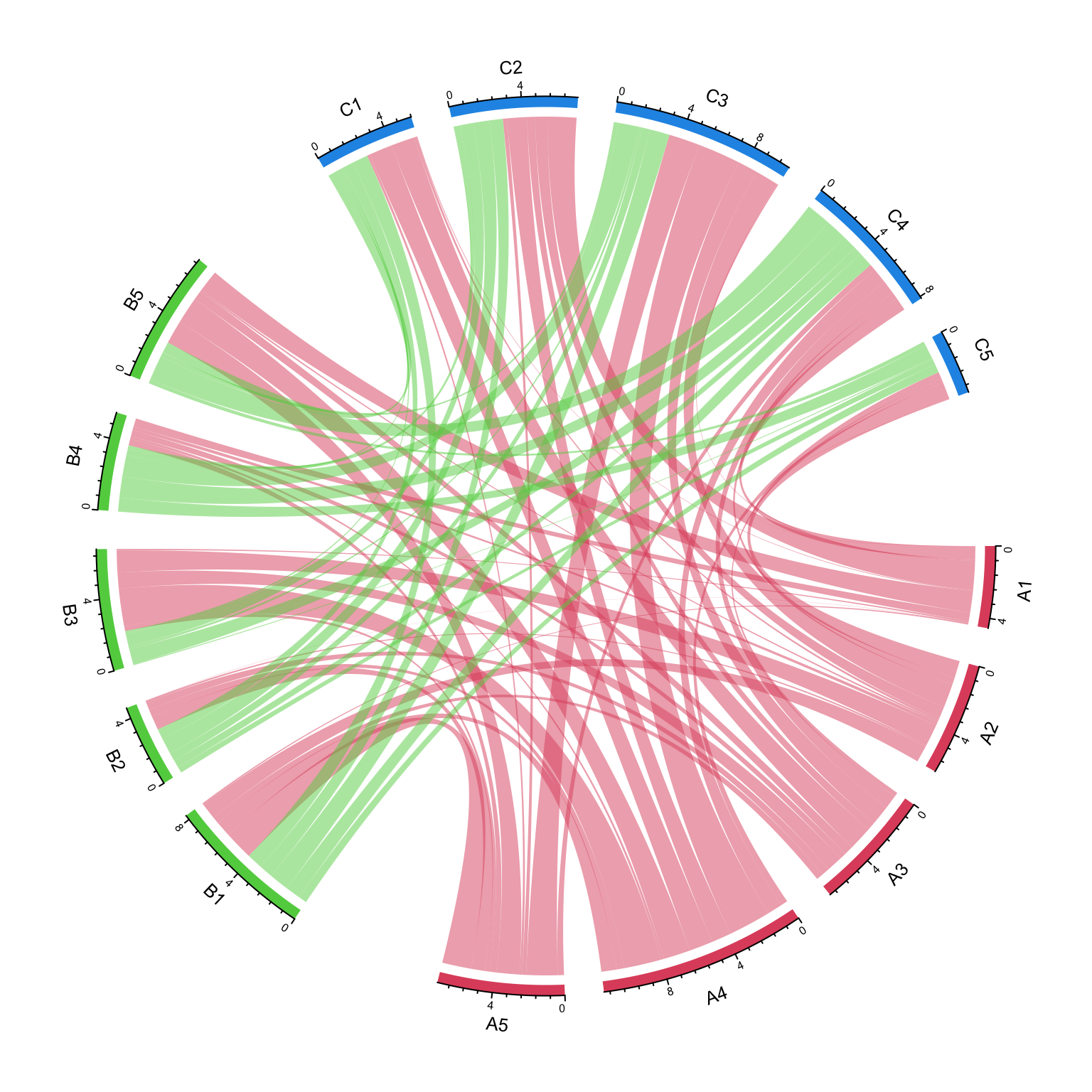
The gap between groups is controlled by big.gap argument and the gap between
sectors is controlled by small.gap argument.
group = structure(gsub("\\d", "", nm), names = nm)
chordDiagram(mat, group = group, grid.col = grid.col, big.gap = 20, small.gap = 5)
circos.clear()
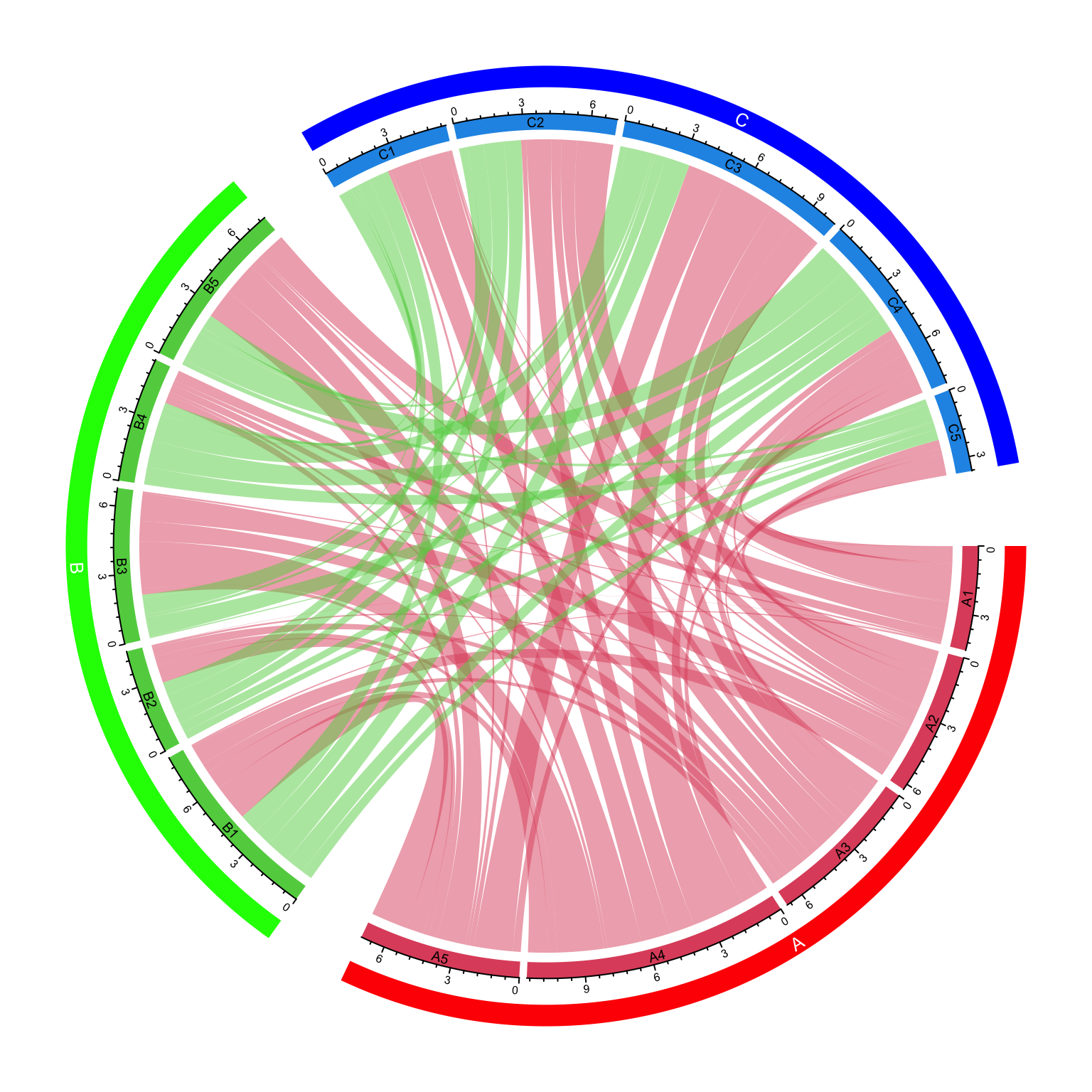
As a normal Chord diagram, the labels and other tracks can be manually adjusted:
group = structure(gsub("\\d", "", nm), names = nm)
chordDiagram(mat, group = group, grid.col = grid.col,
	annotationTrack = c("grid", "axis"),
    preAllocateTracks = list(
        track.height = mm_h(4),
        track.margin = c(mm_h(4), 0)
))
circos.track(track.index = 2, panel.fun = function(x, y) {
    sector.index = get.cell.meta.data("sector.index")
    xlim = get.cell.meta.data("xlim")
    ylim = get.cell.meta.data("ylim")
    circos.text(mean(xlim), mean(ylim), sector.index, cex = 0.6, niceFacing = TRUE)
}, bg.border = NA)

highlight.sector(rownames(mat1), track.index = 1, col = "red",
    text = "A", cex = 0.8, text.col = "white", niceFacing = TRUE)
highlight.sector(colnames(mat1), track.index = 1, col = "green",
    text = "B", cex = 0.8, text.col = "white", niceFacing = TRUE)
highlight.sector(colnames(mat2), track.index = 1, col = "blue",
    text = "C", cex = 0.8, text.col = "white", niceFacing = TRUE)
circos.clear()