Benchmark
Zuguang Gu ( guzuguang@suat-sz.edu.cn )
2026-08-08
Source:vignettes/benchmark.Rmd
benchmark.RmdPrepare
The function unique_strings() generates a vector of
unique strings. It simply uses digest package to
generate MD5 hashes of R objects (in the following example, hashed R
objects are integers).
library(hashtable)
library(microbenchmark)
library(digest)
unique_strings = function(k) {
    sapply(seq_len(k), digest)
}
unique_strings(2)
## [1] "4b5630ee914e848e8d07221556b0a2fb" "c01f179e4b57ab8bd9de309e6d576c48"bm() is only for simplifying code demo in this
document.
bm = function(...) {
    mean(microbenchmark(..., times = 50)$time)
}
There are the following packages implementing hash tables:
- hash, using environment,
-
hashmapR, using C++ library
std::unordered_map, - r2r, using environment.
There are also other indirect hash table implementations:
-
list2env(), converting a list to an environment. - fastmatch, matching between two character vectors where a hash table is internally computated and attached to one character vector.
We compare the performance of creating, querying, deleting and inserting keys of hashtable and other methods.
Create hash tables
There are three implementations of hash tables in hashtable:
-
hash_table(), using C++ librarystd::unordered_map, -
hash_fm_table(), using fastmatch, -
hash_env_table(), using environment.
We test hash tables with size from 10K keys to 100K keys.
size = seq(10000L, 100000L, by = 10000L)list2env() expects the input as a named list.
hashmapR::hashmap() expects keys and values both specified
as lists. r2r::hashmap() creates the hash table in two
steps: create an empty object then fill key-value pairs. Note format
preparation is not included in estimating runtime of benchmarking
functions.
t1 = t2 = t3 = t4 = t5 = t6 = t7 = numeric(length(size))
for(i in seq_along(size)) {
    keys = unique_strings(size[i])
    values = seq_len(size[i])

    t1[i] = bm(hash_table(keys = keys, values = values))
    t2[i] = bm(hash_fm_table(keys = keys, values = values))
    t3[i] = bm(hash_env_table(keys = keys, values = values))

    lt = split(values, keys)
    t4[i] = bm(list2env(lt, hash = TRUE, parent = emptyenv()))
    t5[i] = bm(hash::hash(keys = keys, values = values))

    lt_keys = split(keys, keys)
    lt_values = split(values, keys)
    t6[i] = bm({h = hashmapR::hashmap(); h$set(lt_keys, lt_values, vectorize = TRUE)})
    t7[i] = bm({h = r2r::hashmap(); h[keys] = values})
}
matplot(size, cbind(t1, t2, t3, t4, t5, t6, t7)/1000, type = "o",
    lty = 1, col = 1:7, pch = 16, cex = 0.5,
    xlab = "size", ylab = "microseconds", main = "Create hash tables")
legend("topleft", lty = 1, col = 1:7,
    legend = c("hash_table", "hash_fm_table", "hash_env_table", "list2env", "hash", "hashmapR", "r2r"))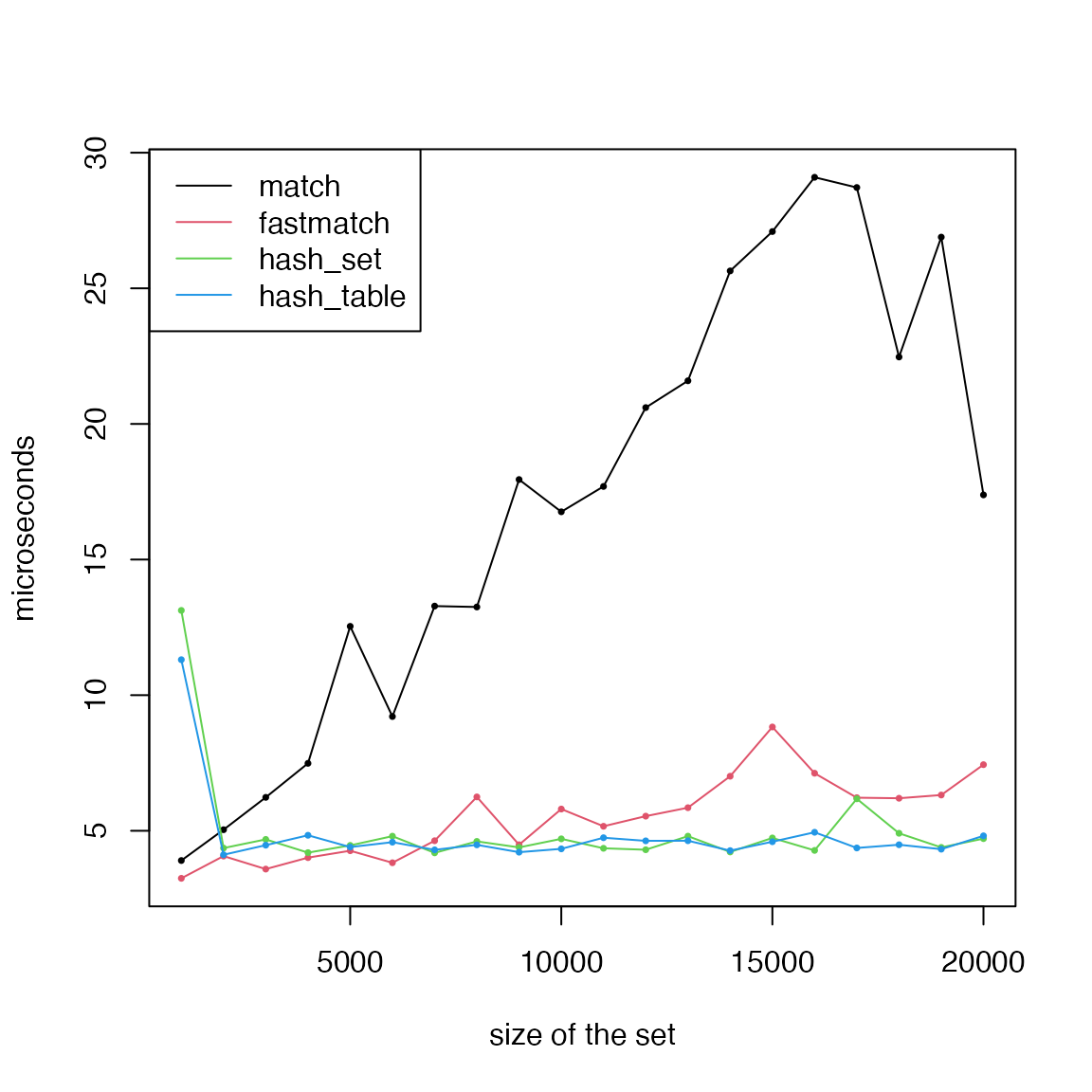
Obviously, hashtable is the fastest to create hash tables.
Query
Query a single key. Except hashmapR, all hash table
objects created by various methods support [[ index to get
a single value.
t1 = t2 = t3 = t4 = t5 = t6 = t7 = numeric(length(size))
for(i in seq_along(size)) {
    keys = unique_strings(size[i])
    values = seq_along(keys)

    h1 = hash_table(keys = keys, values = values)
    h2 = hash_fm_table(keys = keys, values = values)
    h3 = hash_env_table(keys = keys, values = values)

    lt = split(values, keys)
    h4 = list2env(lt, hash = TRUE, parent = emptyenv())

    h5 = hash::hash(keys = keys, values = values)

    h6 = hashmapR::hashmap()
    h6$set(split(keys, keys), split(values, keys), vectorize = TRUE)

    h7 = r2r::hashmap()
    h7[keys] = values

    t1[i] = bm(h1[[sample(keys, 1)]])
    t2[i] = bm(h2[[sample(keys, 1)]])
    t3[i] = bm(h3[[sample(keys, 1)]])
    t4[i] = bm(h4[[sample(keys, 1)]])
    t5[i] = bm(h5[[sample(keys, 1)]])
    t6[i] = bm(h6$get(sample(keys, 1)))
    t7[i] = bm(h7[[sample(keys, 1)]])
}
matplot(size, cbind(t1, t2, t3, t4, t5, t6, t7)/1000, type = "o",
    lty = 1, col = 1:7, pch = 16, cex = 0.5,
    xlab = "size", ylab = "microseconds", main = "Query a single key")
legend("topleft", lty = 1, col = 1:7,
    legend = c("hash_table", "hash_fm_table", "hash_env_table", "list2env", "hash", "hashmapR", "r2r"))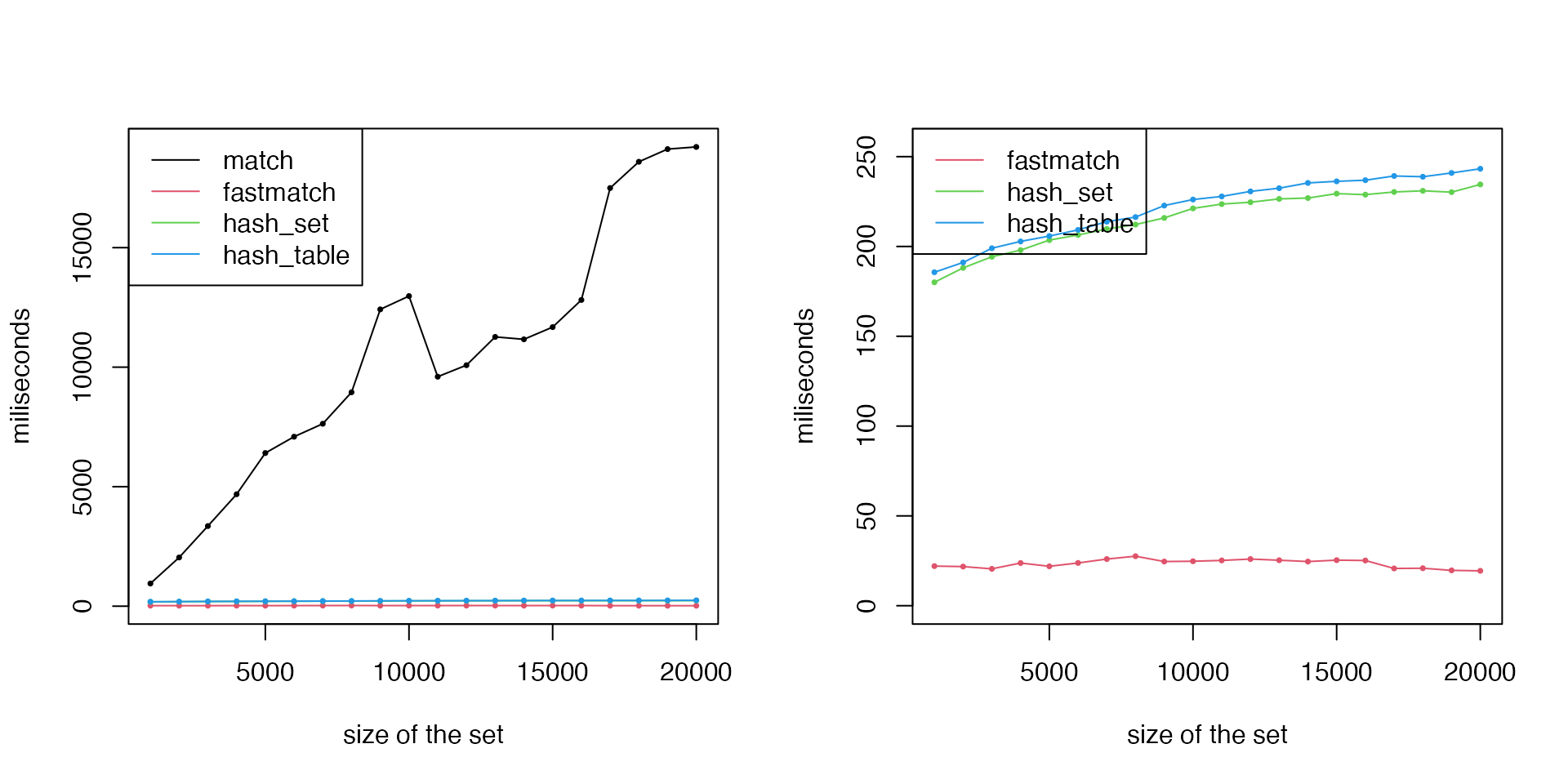
All hash-functions have similar performance. The small difference of runtime is due to their specific implementations, e.g., hashtable implements functions using S4, so it needs a little bit more steps on method dispatch.
Query multiple keys. We use mget() to get multiple
values from an environment. Many methods support [ index to
get multiple values.
par(mfrow = c(2, 2))
for(p in c(0.01, 0.1, 0.25, 0.5)) {
    t1 = t2 = t3 = t4 = t5 = t6 = t7 = numeric(length(size))
    for(i in seq_along(size)) {
        keys = unique_strings(size[i])
        values = seq_along(keys)

        h1 = hash_table(keys = keys, values = values)
        h2 = hash_fm_table(keys = keys, values = values)
        h3 = hash_env_table(keys = keys, values = values)

        lt = split(values, keys)
        h4 = list2env(lt, hash = TRUE, parent = emptyenv())

        h5 = hash::hash(keys = keys, values = values)

        h6 = hashmapR::hashmap()
        h6$set(split(keys, keys), split(values, keys), vectorize = TRUE)

        h7 = r2r::hashmap()
        h7[keys] = values

        nk = round(p*size[i])
        t1[i] = bm(h1[sample(keys, nk)])
        t2[i] = bm(h2[sample(keys, nk)])
        t3[i] = bm(h3[sample(keys, nk)])
        t4[i] = bm(mget(sample(keys, nk), h4))
        t5[i] = bm(h5[sample(keys, nk)])
        t6[i] = bm(h6$get(sample(keys, nk)))
        t7[i] = bm(h7[sample(keys, nk)])
    }
    matplot(size, cbind(t1, t2, t3, t4, t5, t6, t7)/1000, type = "o",
        lty = 1, col = 1:7, pch = 16, cex = 0.5,
        xlab = "size", ylab = "microseconds", main = paste0("Query multiple keys, ", p*100, "%"))
    legend("topleft", lty = 1, col = 1:7,
        legend = c("hash_table", "hash_fm_table", "hash_env_table", "list2env", "hash", "hashmapR", "r2r"))
}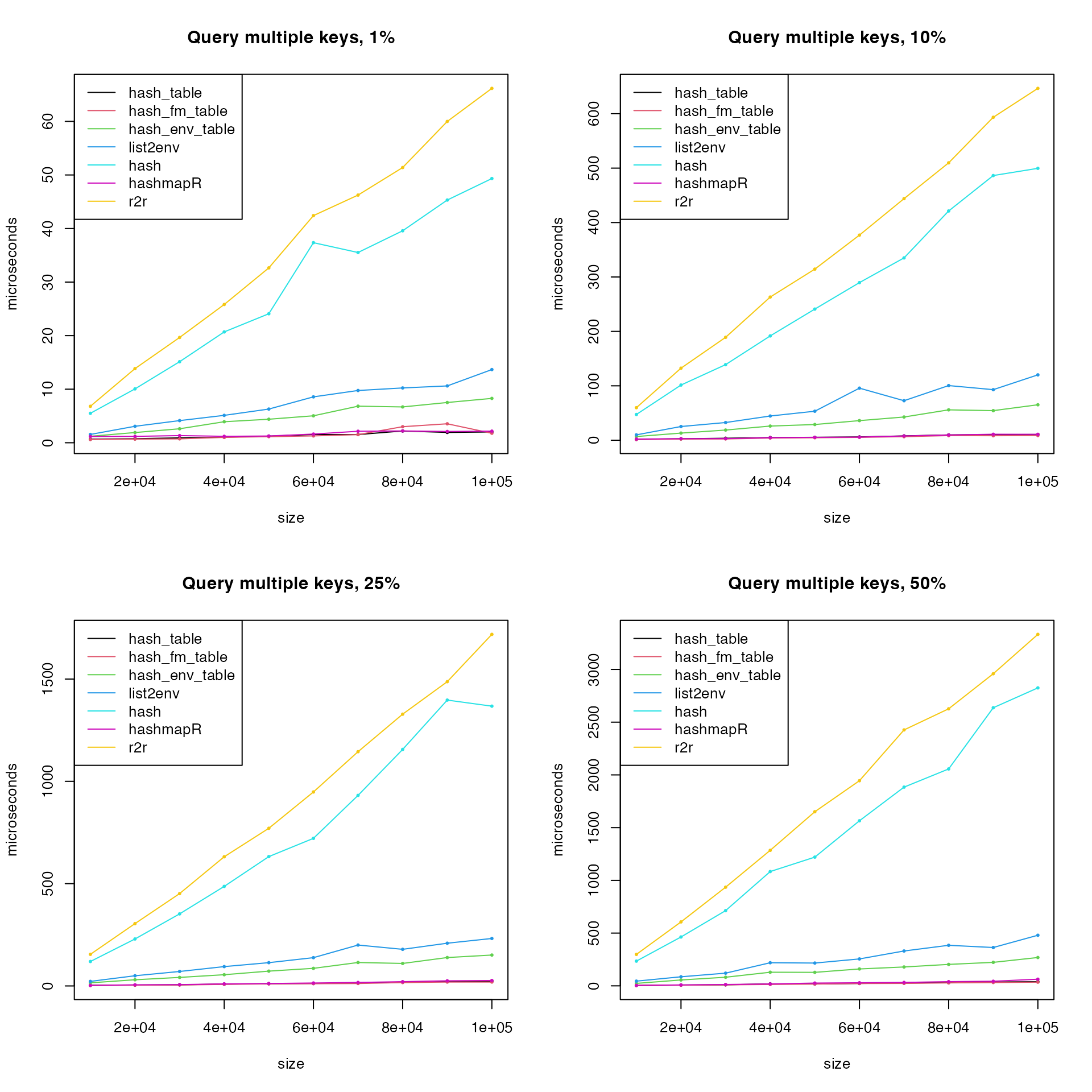
r2r and hash performs badly when
querying multiple keys. Remove r2r, hash()
also remove two environment-functions list2env() and
hash_env_table(), then remake the last plot:
matplot(size, cbind(t1, t2, t6)/1000, type = "o",
    lty = 1, col = c(1:2, 6), pch = 16, cex = 0.5,
    xlab = "size", ylab = "microseconds", main = paste0("Query multiple keys, ", p*100, "%"))
legend("topleft", lty = 1, col = c(1:2, 6),
    legend = c("hash_table", "hash_fm_table", "hashmapR"))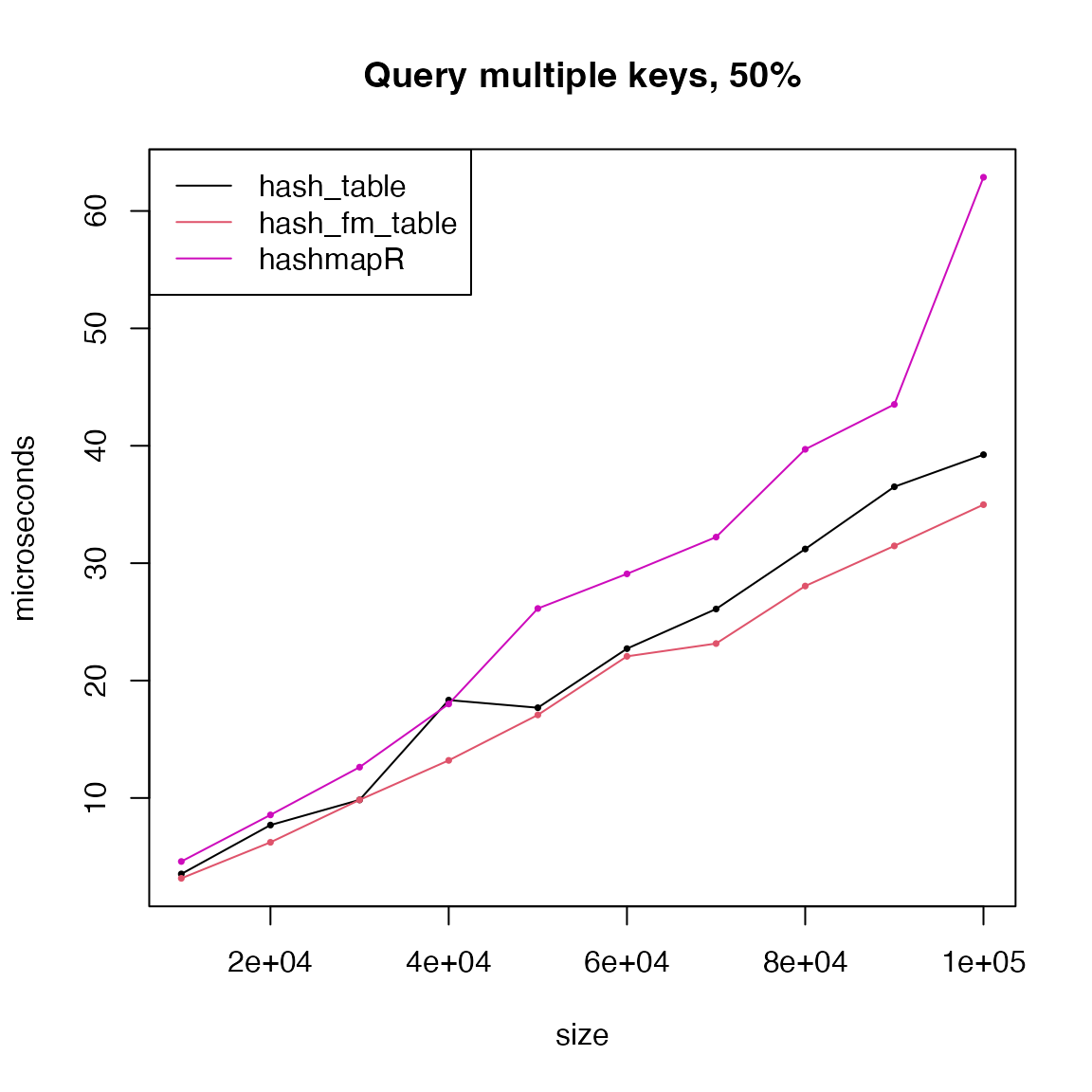
hash_table(), hash_fm_table() and
hashmapR only have very small difference.
Insertion
Except hashmapR, all hash table objects created by
various methods support [[<- to set a single value. Note
hash_fm_table() is not incluced because it does not allow
to insert new keys.
Note unique_strings() is based on MD5 hashes of
integers, rnorm(1) generates numeric values, so
digest(rnorm(1)) generates new keys.
t1 = t3 = t4 = t5 = t6 = t7 = numeric(length(size))
for(i in seq_along(size)) {
    keys = unique_strings(size[i])
    values = seq_along(keys)

    h1 = hash_table(keys = keys, values = values)
    h3 = hash_env_table(keys = keys, values = values)

    lt = split(values, keys)
    h4 = list2env(lt, hash = TRUE, parent = emptyenv())

    h5 = hash::hash(keys = keys, values = values)

    h6 = hashmapR::hashmap()
    h6$set(split(keys, keys), split(values, keys), vectorize = TRUE)

    h7 = r2r::hashmap()
    h7[keys] = values

    t1[i] = bm(h1[[digest(rnorm(1))]] <- 1L)
    t3[i] = bm(h3[[digest(rnorm(1))]] <- 1L)
    t4[i] = bm(h4[[digest(rnorm(1))]] <- 1L)
    t5[i] = bm(h5[[digest(rnorm(1))]] <- 1L)
    t6[i] = bm(h6$set(digest(rnorm(1)), 1L))
    t7[i] = bm(h7[[digest(rnorm(1))]] <- 1L)
}
matplot(size, cbind(t1, t3, t4, t5, t6, t7)/1000, type = "o",
    lty = 1, col = c(1, 3:7), pch = 16, cex = 0.5,
    xlab = "size", ylab = "microseconds", main = "Insert a single key")
legend("topleft", lty = 1, col = c(1, 3:7),
    legend = c("hash_table", "hash_env_table", "list2env", "hash", "hashmapR", "r2r"))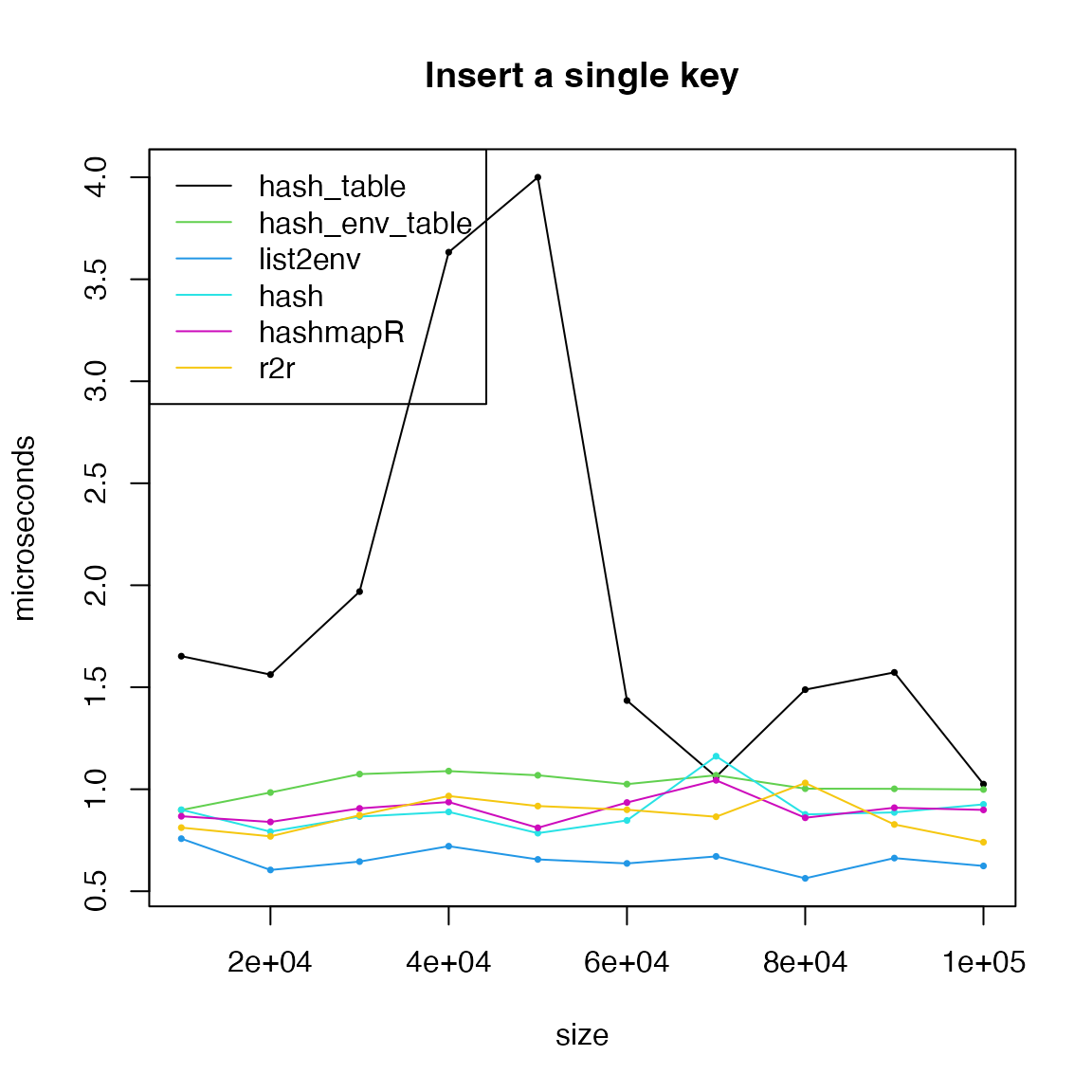
Deletion
Difference methods have different interfaces to delete key-value
pairs. hash_fm_table() is not incluced because it does not
allow to delete keys.
t1 = t3 = t4 = t5 = t6 = t7 = numeric(length(size))
for(i in seq_along(size)) {
    keys = unique_strings(size[i])
    values = seq_along(keys)

    h1 = hash_table(keys = keys, values = values)
    h3 = hash_env_table(keys = keys, values = values)

    lt = split(values, keys)
    h4 = list2env(lt, hash = TRUE, parent = emptyenv())

    h5 = hash::hash(keys = keys, values = values)

    h6 = hashmapR::hashmap()
    h6$set(split(keys, keys), split(values, keys), vectorize = TRUE)

    h7 = r2r::hashmap()
    h7[keys] = values

    t1[i] = bm(hash_delete(h1, sample(keys, 1)))
    t3[i] = bm(hash_delete(h3, sample(keys, 1)))
    t4[i] = bm(rm(list = sample(keys, 1), h4))
    t5[i] = bm(hash::delete(sample(keys, 1), h5))
    t6[i] = bm(h6$remove(sample(keys, 1)))
    t7[i] = bm(r2r::delete(h7, sample(keys, 1)))
}
matplot(size, cbind(t1, t3, t4, t5, t6, t7)/1000, type = "o",
    lty = 1, col = c(1, 3:7), pch = 16, cex = 0.5,
    xlab = "size", ylab = "microseconds", main = "Delete a single key")
legend("left", lty = 1, col = c(1, 3:7),
    legend = c("hash_table", "hash_env_table", "list2env", "hash", "hashmapR", "r2r"))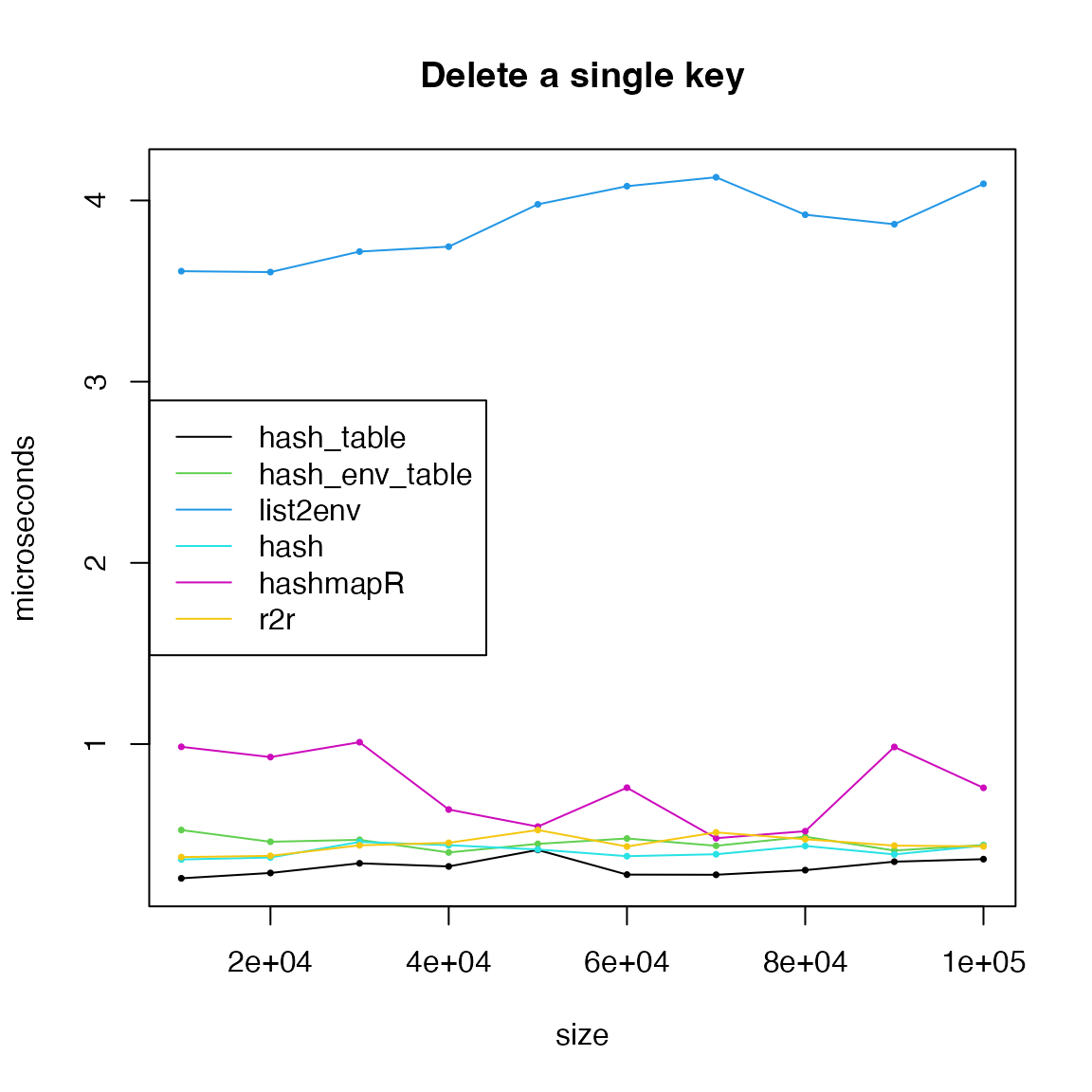
list2env() performs obviously bad. Note for environment,
we did not use h4[[key]] = NULL because it just assign
NULL to key but the key still exists.
Compare to match-family functions
People may think named vectors (including lists) behave like hashes.
vec = c("foo" = 1, "bar" = 2)
vec
## foo bar
## 1 2
vec[["foo"]]## [1] 1
lt = list("foo" = 1, "bar" = "text")
lt$foo
## [1] 1Actually they are not. Names are just normal character vectors, but attached to the object as an attributes.
attributes(vec)## $names
## [1] "foo" "bar"
attributes(lt)## $names
## [1] "foo" "bar"So using names as indices basically does matching in the “names” attributes.
There are following match-family functions:
-
pmatch(), used innames(),$,[[,[, -
match(), used in%in%,intersect(),unique(),duplicated(), -
fastmatch, a faster version of
match(), synonyms functions arefmatch()and%fin%, -
data.table::chmatch(), also a faster version ofmatch(), synonyms functions arechmatch()and%chin%.
pmatch() means partial matching. It matches elements if
substrings can be uniquely mapped.
match(), fastmatch and
chmatch() do the complete matching. They have the same
interface:
function(x, table, ...)where x is the query vector, i.e. the keys, and
table is the data vector, i.e. all keys. First, all of
match(), fastmatch and
chmatch() internally generate hash tables for fast
matching. The difference is match() and
chmatch() generate hash tables in every function call,
which means, even table is the same, multiple calls to
match() or chmatch(), the internal hash table
needs to be rebuilt, while fastmatch directly attaches
the hash table to table as an internal attribute, so in
afterward repeated calls of fastmatch::fmatch(), the hash
table can be directly reused.
library(fastmatch)
library(data.table)
t1 = t2 = t3 = t4 = t5 = t6 = t7 = t8 = numeric(length(size))
for(i in seq_along(size)) {
    keys = unique_strings(size[i])
    values = seq_along(keys)

    x = structure(values, names = keys)

    h1 = hash_table(keys = keys, values = values)
    h2 = hash_fm_table(keys = keys, values = values)
    h3 = hash_env_table(keys = keys, values = values)

    t1[i] = bm(h1[[sample(keys, 1)]])
    t2[i] = bm(h2[[sample(keys, 1)]])

    h6 = hashmapR::hashmap()
    h6$set(split(keys, keys), split(values, keys), vectorize = TRUE)
    t6[i] = bm(h6$get(sample(keys, 1)))

    t4[i] = bm(x[[sample(keys, 1)]])
    t5[i] = bm(x[[match(sample(keys, 1), keys)]])
    t7[i] = bm(x[[fmatch(sample(keys, 1), keys)]])
    t8[i] = bm(x[[chmatch(sample(keys, 1), keys)]])
}
matplot(size, cbind(t1, t2, t3, t6, t4, t5, t7, t8)/1000, type = "o",
    lty = 1, col = c(1:3, 6, 4, 5, 7, 8), pch = 16, cex = 0.5,
    xlab = "size", ylab = "microseconds", main = "Query a single key, match-family")
legend("topleft", lty = 1, col = c(1:3, 6, 4, 5, 7, 8),
    legend = c("hash_table", "hash_fm_table", "hash_env_table", "hashmapR", "pmatch/names", "match", "fastmatch", "chmatch"))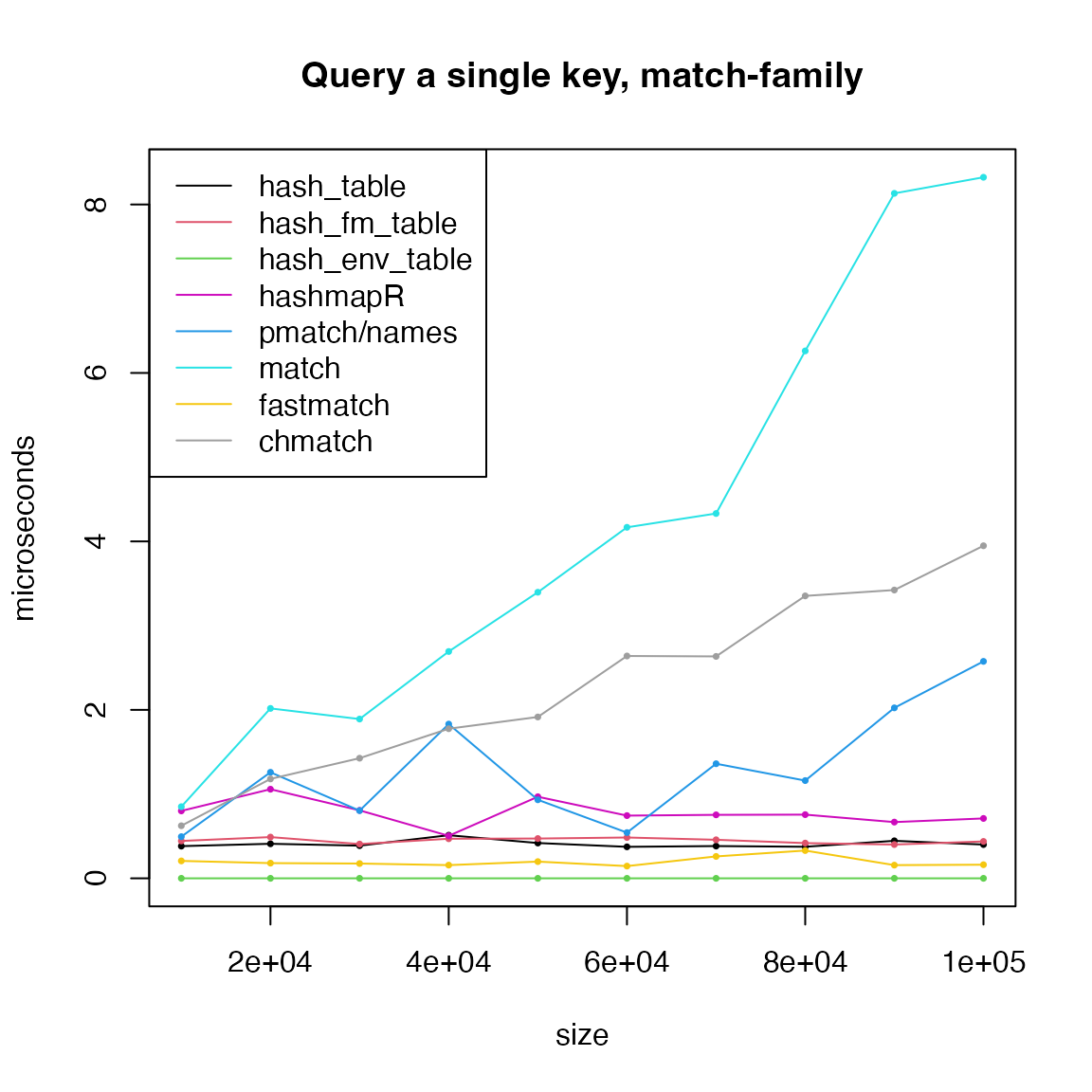
We can see hash-family functions have time complexity of
to the hash table size once the hash table is already created.
fastmatch is also fast because the hash table only
needs to be calculated once. pmatch(), match()
and chmatch() have linear complexity to the size of “the
data vector”.
Next query multiple keys with match-family functions.
par(mfrow = c(2, 2))
for(p in c(0.01, 0.1, 0.25, 0.5)) {
    t1 = t2 = t3 = t4 = t5 = t6 = t7 = numeric(length(size))
    for(i in seq_along(size)) {
        keys = unique_strings(size[i])
        values = seq_along(keys)

        x = structure(values, names = keys)

        h1 = hash_table(keys = keys, values = values)
        h2 = hash_fm_table(keys = keys, values = values)
        h3 = hash_env_table(keys = keys, values = values)

        t1[i] = bm(h1[sample(keys, round(p*size[i]))])
        t2[i] = bm(h2[sample(keys, round(p*size[i]))])
        t3[i] = bm(h3[sample(keys, round(p*size[i]))])

        h6 = hashmapR::hashmap()
        h6$set(split(keys, keys), split(values, keys), vectorize = TRUE)
        t6[i] = bm(h6$get(sample(keys, round(p*size[i]))))

        t4[i] = bm(x[sample(keys, round(p*size[i]))])
        t5[i] = bm(x[match(sample(keys, round(p*size[i])), keys)])
        t7[i] = bm(x[fmatch(sample(keys, round(p*size[i])), keys)])
        t8[i] = bm(x[chmatch(sample(keys, round(p*size[i])), keys)])
    }
    matplot(size, cbind(t1, t2, t3, t6, t4, t5, t7, t8)/1000, type = "o",
        lty = 1, col = c(1:3, 6, 4, 5, 7, 8), pch = 16, cex = 0.5,
        xlab = "size", ylab = "microseconds", main = paste0("Query multiple keys, match-family, ", p*100, "%"))
    legend("topleft", lty = 1, col = c(1:3, 6, 4, 5, 7, 8),
        legend = c("hash_table", "hash_fm_table", "hash_env_table", "hashmapR", "pmatch/names", "match", "fastmatch", "chmatch"))
}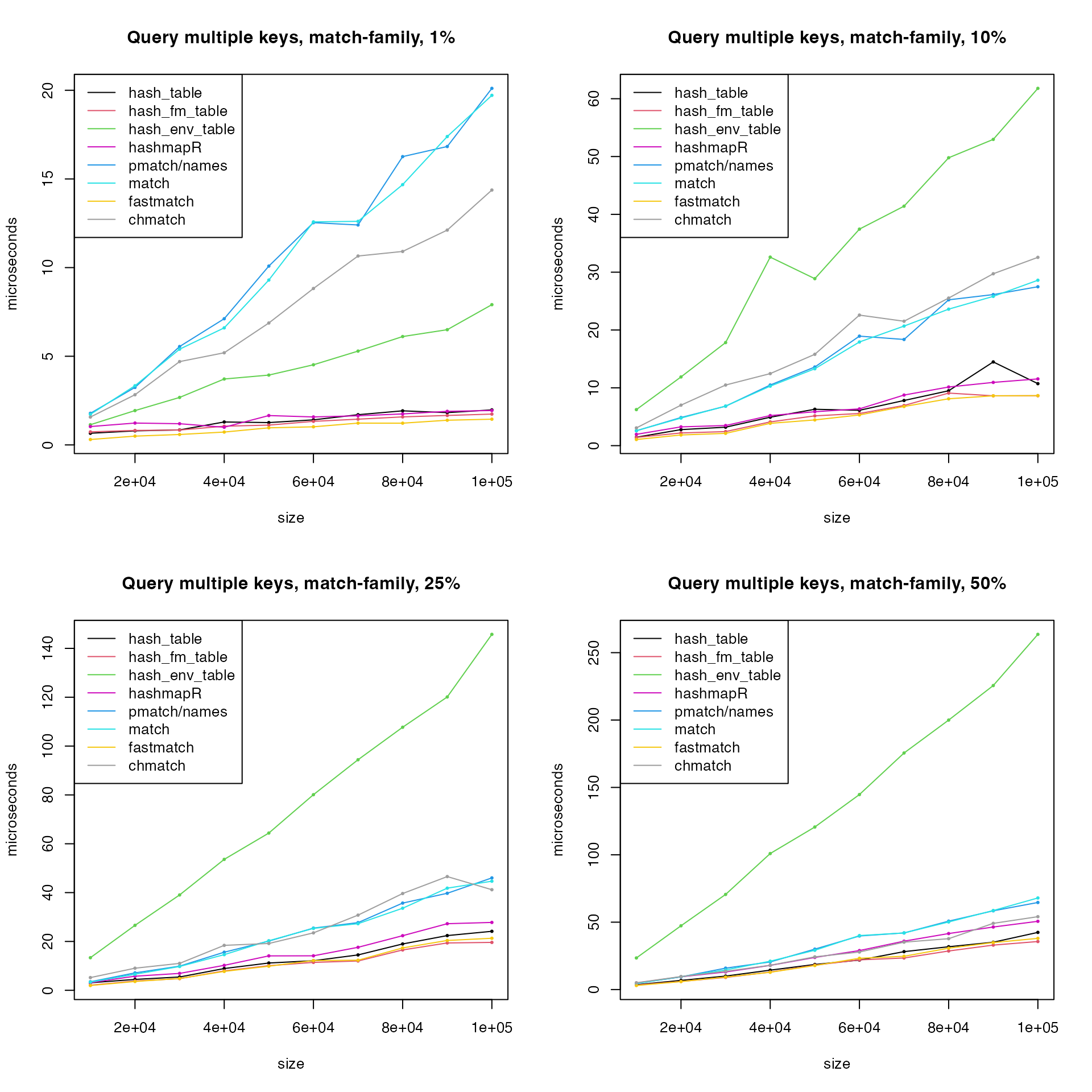
Now the match-family functions have good performance when querying multiple keys. As has been explained, for multiple calls, match-family functions performs bad because the internal hash tables have to be rebuilt, but for multiple key queries in a single call, keys can be directly queried from the internal hash table.
Remove hash_env_table() and remake the last plot.
matplot(size, cbind(t1, t2, t6, t4, t5, t7, t8)/1000, type = "o",
    lty = 1, col = c(1:2, 6, 4, 5, 7, 8), pch = 16, cex = 0.5,
    xlab = "size", ylab = "microseconds", main = paste0("Query multiple keys, match-family, ", p*100, "%"))
legend("topleft", lty = 1, col = c(1:2, 6, 4, 5, 7, 8),
    legend = c("hash_table", "hash_fm_table", "hashmapR", "pmatch/names", "match", "fastmatch", "chmatch"))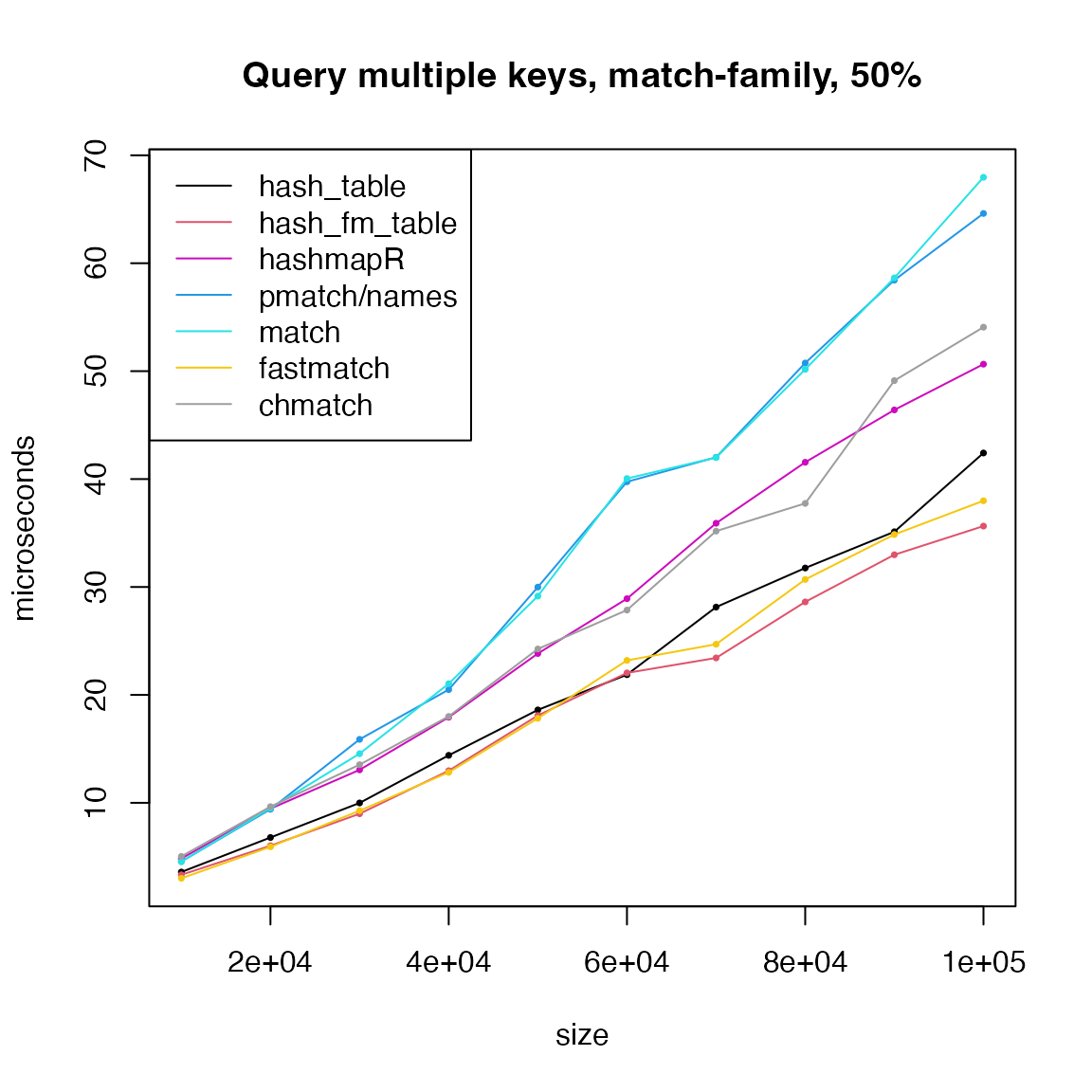
Hash set
Hash set is basically very similar as hash table. The only difference is for hash table, there are values associated with keys, while for hash set, there are only keys.
We first test querying a single key, which is to test whether the key exists in the hash set.
t1 = t2 = t3 = t4 = t5 = t6 = t7 = numeric(length(size))
for(i in seq_along(size)) {
    keys = unique_strings(size[i])

    h1 = hash_set(keys)
    h2 = hash_fm_set(keys)
    h3 = hash_env_set(keys)
    h7 = r2r::hashset(keys)

    t1[i] = bm(h1[[sample(keys, 1)]])
    t2[i] = bm(h2[[sample(keys, 1)]])
    t3[i] = bm(h3[[sample(keys, 1)]])
    t7[i] = bm(h7[[sample(keys, 1)]])

    t4[i] = bm(match(sample(keys, 1), keys))
    t5[i] = bm(fmatch(sample(keys, 1), keys))
    t6[i] = bm(chmatch(sample(keys, 1), keys))
}
matplot(size, cbind(t1, t2, t3, t7, t4, t5, t6)/1000, type = "o",
    lty = 1, col = c(1:3, 7, 4:6), pch = 16, cex = 0.5,
    xlab = "size", ylab = "microseconds", main = "Query a single key")
legend("topleft", lty = 1, col = c(1:3, 7, 4:6),
    legend = c("hash_set", "hash_fm_set", "hash_env_set", "r2r", "match", "fastmatch", "chmatch"))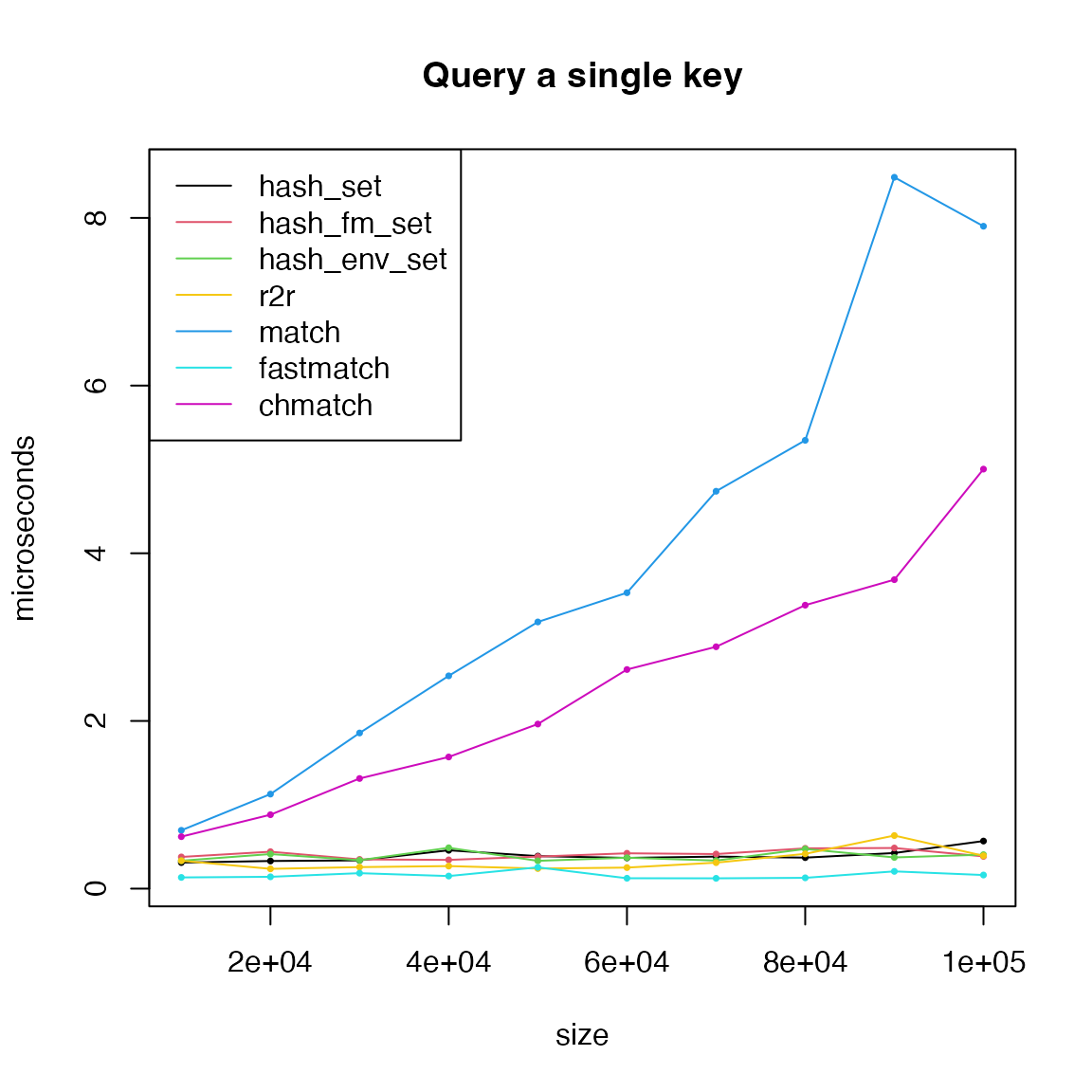
We remove match() and chmatch() and remake
the last plot.
matplot(size, cbind(t1, t2, t3, t7, t5)/1000, type = "o",
    lty = 1, col = c(1:3, 7, 5), pch = 16, cex = 0.5,
    xlab = "size", ylab = "microseconds", main = "Query a single key")
legend("topleft", lty = 1, col = c(1:3, 7, 5),
    legend = c("hash_set", "hash_fm_set", "hash_env_set", "r2r", "fastmatch"))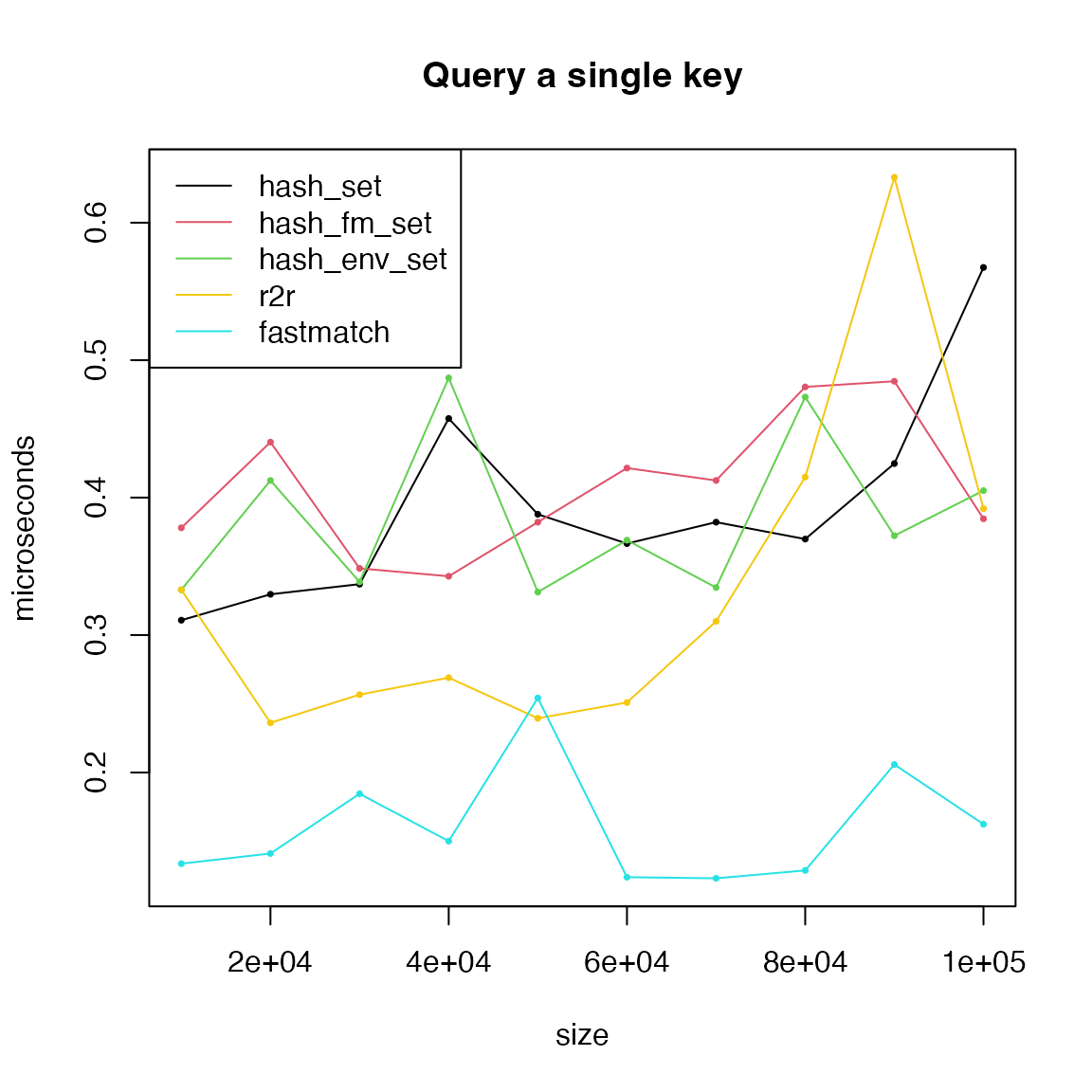
Next query multiple keys.
par(mfrow = c(2, 2))
for(p in c(0.01, 0.1, 0.25, 0.5)) {
    t1 = t2 = t3 = t4 = t5 = t6 = t7 = numeric(length(size))
    for(i in seq_along(size)) {
        keys = unique_strings(size[i])

        h1 = hash_set(keys)
        h2 = hash_fm_set(keys)
        h3 = hash_env_set(keys)
        h7 = r2r::hashset(keys)

        t1[i] = bm(h1[sample(keys, round(p*size[i]))])
        t2[i] = bm(h2[sample(keys, round(p*size[i]))])
        t3[i] = bm(h3[sample(keys, round(p*size[i]))])
        t7[i] = bm(h7[sample(keys, round(p*size[i]))])

        t4[i] = bm(match(sample(keys, round(p*size[i])), keys))
        t5[i] = bm(fmatch(sample(keys, round(p*size[i])), keys))
        t6[i] = bm(chmatch(sample(keys, round(p*size[i])), keys))
    }
    matplot(size, cbind(t1, t2, t3, t7, t4, t5, t6)/1000, type = "o",
        lty = 1, col = c(1:3, 7, 4:5), pch = 16, cex = 0.5,
        xlab = "size", ylab = "microseconds", main = paste0("Query multiple keys, ", p*100, "%"))
    legend("topleft", lty = 1, col = c(1:3, 7, 4:6),
        legend = c("hash_set", "hash_fm_set", "hash_env_set", "r2r", "match", "fastmatch", "chmatch"))
}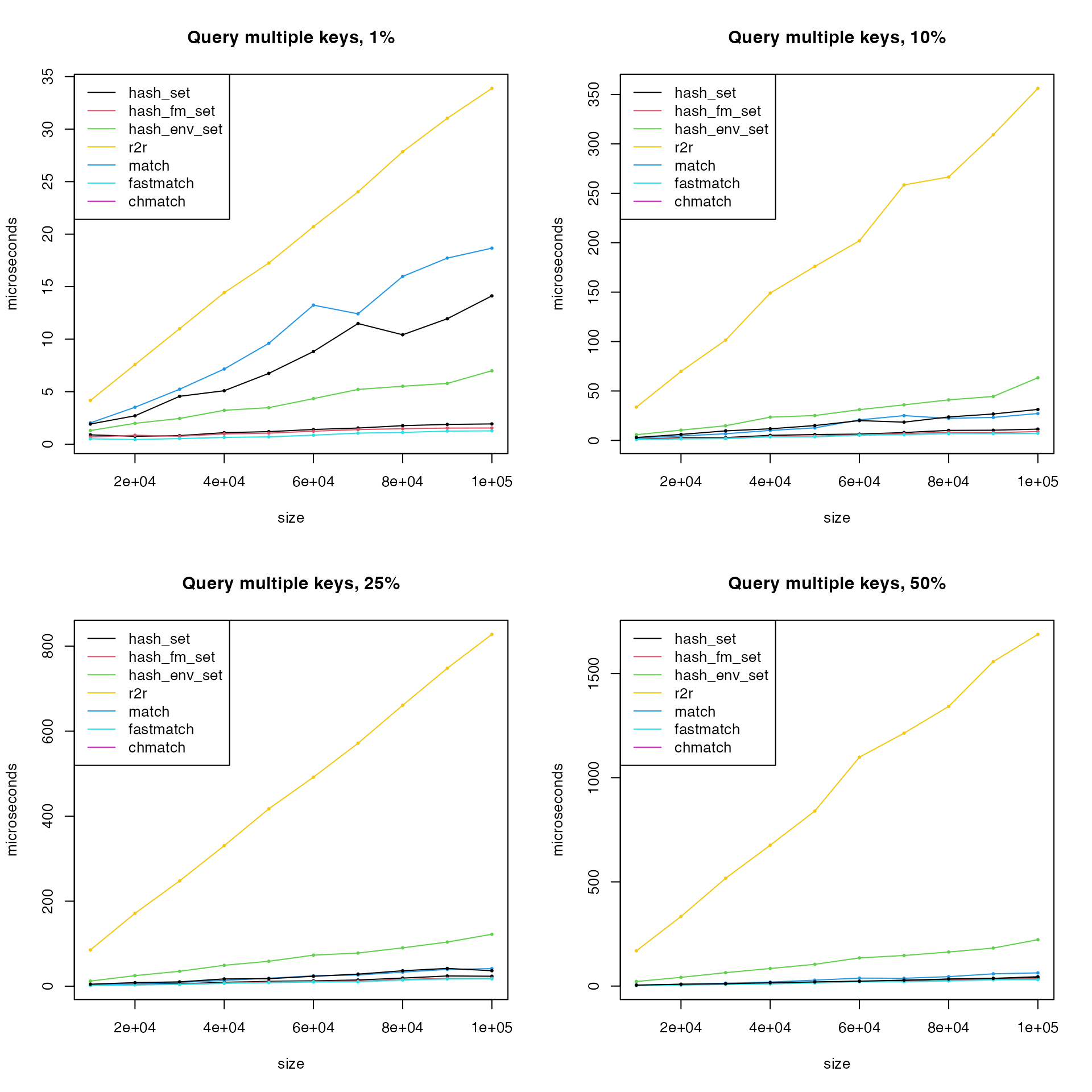
Obviously r2r has very bad performance when querying
multiple keys. Remove r2r also hash_env_set()
and remake the last plot.
matplot(size, cbind(t1, t2, t4, t5, t6)/1000, type = "o",
    lty = 1, col = c(1:2, 4:6), pch = 16, cex = 0.5,
    xlab = "size", ylab = "microseconds", main = paste0("Query multiple keys, ", p*100, "%"))
legend("topleft", lty = 1, col = c(1:2, 4:6),
    legend = c("hash_set", "hash_fm_set", "match", "fastmatch", "chmatch"))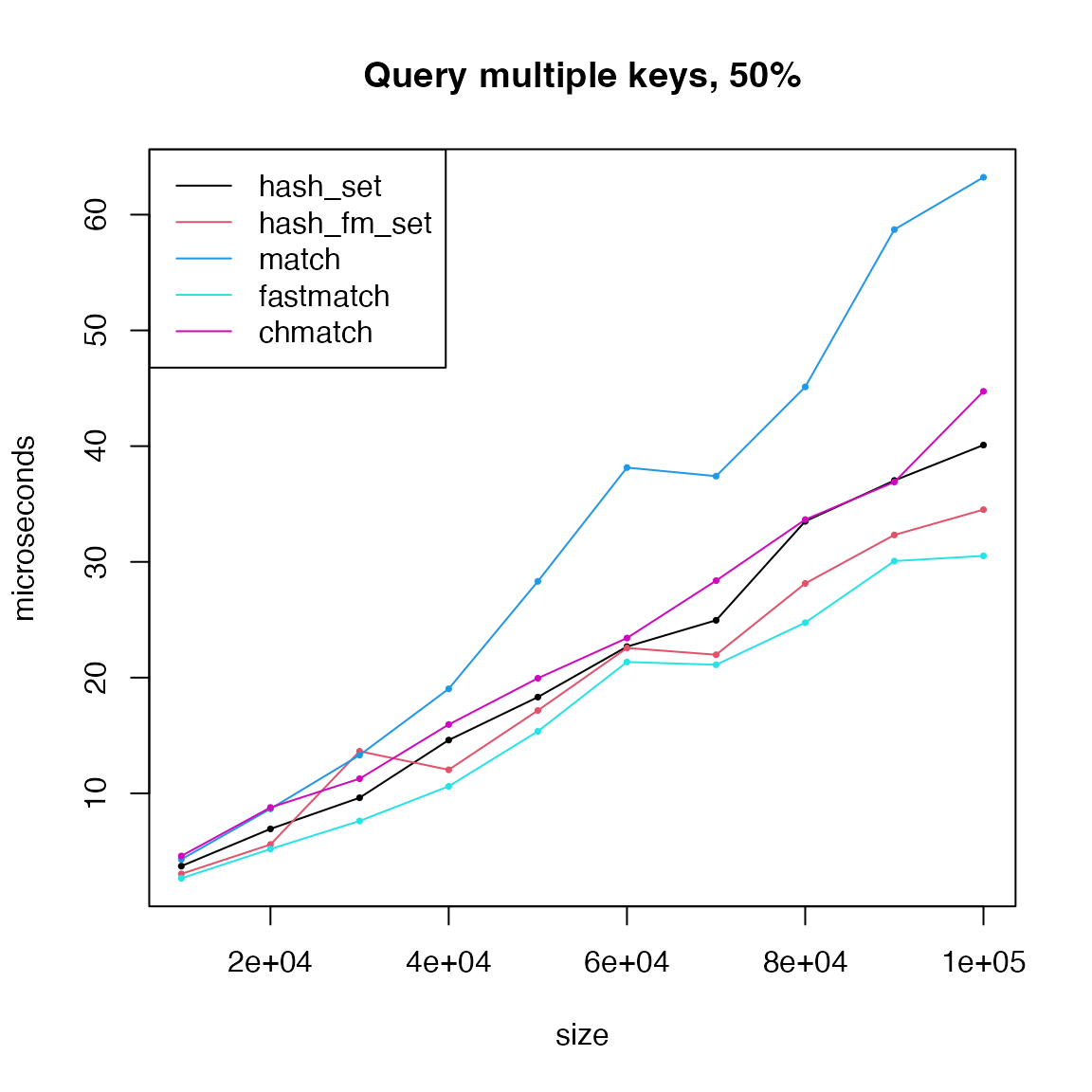
Compare hash tables and hash sets
In hashtable, hash tables and hash sets are implements similarly in the three implementations.
t1 = t2 = t3 = t4 = t5 = t6 = numeric(length(size))
for(i in seq_along(size)) {
    keys = unique_strings(size[i])
    values = seq_len(size[i])

    h1 = hash_table(keys = keys, values = values)
    h2 = hash_fm_table(keys = keys, values = values)
    h3 = hash_env_table(keys = keys, values = values)

    h4 = hash_set(keys = keys)
    h5 = hash_fm_set(keys = keys)
    h6 = hash_env_set(keys = keys)

    p = 0.1
    t1[i] = bm(h1[sample(keys, round(p*size[i]))])
    t2[i] = bm(h2[sample(keys, round(p*size[i]))])
    t3[i] = bm(h3[sample(keys, round(p*size[i]))])
    t4[i] = bm(h4[sample(keys, round(p*size[i]))])
    t5[i] = bm(h5[sample(keys, round(p*size[i]))])
    t6[i] = bm(h6[sample(keys, round(p*size[i]))])
}
matplot(size, cbind(t1, t2, t3, t4, t5, t6)/1000, type = "o",
    lty = c(1, 1, 1, 2, 2, 2), col = c(1, 2, 3, 1, 2, 3), pch = 16, cex = 0.5,
    xlab = "size", ylab = "microseconds", main = "Query multiple keys")
legend("topleft", lty = c(1, 1, 1, 2, 2, 2), col = c(1, 2, 3, 1, 2, 3),
    legend = c("hash_table", "hash_fm_table", "hash_env_table", "hash_set", "hash_fm_set", "hash_env_set"))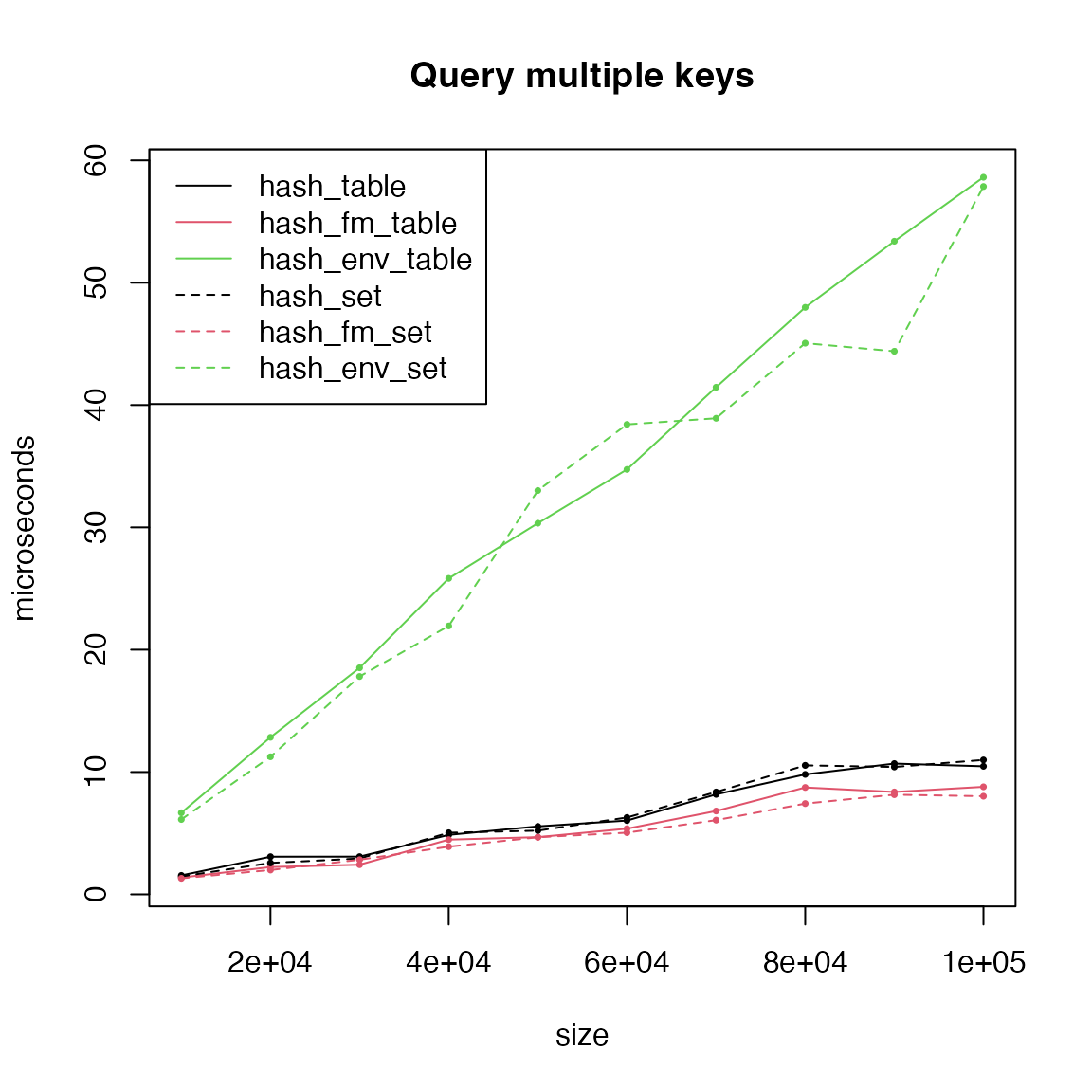
Summarize
For creating hash tables, hashtable is fast.
For querying single keys, all hash-functions are fast, but the
runtime of pmatch(), match() and
chmatch() increases linearly to the size of the data.
For querying multiple keys, hash_fm_set() and
fmatch() is the fastest. If hash tables are changable, then
hash_table() and hashmapR can be
considered as replacement.
For inserting new keys, all hash-functions are similar.
For deleting keys, list2env() (which uses
rm()) is relatively slow. Other functions are similar.
## R version 4.6.0 (2026-04-24)
## Platform: aarch64-apple-darwin23
## Running under: macOS Tahoe 26.5.2
##
## Matrix products: default
## BLAS:   /Library/Frameworks/R.framework/Versions/4.6/Resources/lib/libRblas.0.dylib
## LAPACK: /Library/Frameworks/R.framework/Versions/4.6/Resources/lib/libRlapack.dylib;  LAPACK version 3.12.1
##
## locale:
## [1] en_GB.UTF-8/en_GB.UTF-8/en_GB.UTF-8/C/en_GB.UTF-8/en_GB.UTF-8
##
## time zone: Asia/Shanghai
## tzcode source: internal
##
## attached base packages:
## [1] stats     graphics  grDevices utils     datasets  methods   base
##
## other attached packages:
## [1] data.table_1.18.4    fastmatch_1.1-8      digest_0.6.39
## [4] microbenchmark_1.5.0 hashtable_1.0.1      knitr_1.51
##
## loaded via a namespace (and not attached):
##  [1] cli_3.6.6         rlang_1.3.0       xfun_0.60         otel_0.2.0
##  [5] textshaping_1.0.5 jsonlite_2.0.0    hash_2.2.6.4      htmltools_0.5.9
##  [9] ragg_1.5.2        sass_0.4.10       rmarkdown_2.31    evaluate_1.0.5
## [13] jquerylib_0.1.4   fastmap_1.2.0     yaml_2.3.12       lifecycle_1.0.5
## [17] hashmapR_1.0.1    compiler_4.6.0    fs_2.1.0          htmlwidgets_1.6.4
## [21] Rcpp_1.1.2        systemfonts_1.3.2 R6_2.6.1          bslib_0.11.0
## [25] tools_4.6.0       r2r_0.1.2         pkgdown_2.2.1     cachem_1.1.0
## [29] desc_1.4.3